Tenorshare PixPretty | Windows | Mac | 1-Month License | Account



Get the item as described or your money back.
Account valid until 01/31/2026
Access to all features
400 credits per month
Supports 2 PCs
Bonuses are valid for 1 month.
Continuous updates
1 photo = 1 credit
PixPretty - Professional AI Portrait Photo Editor
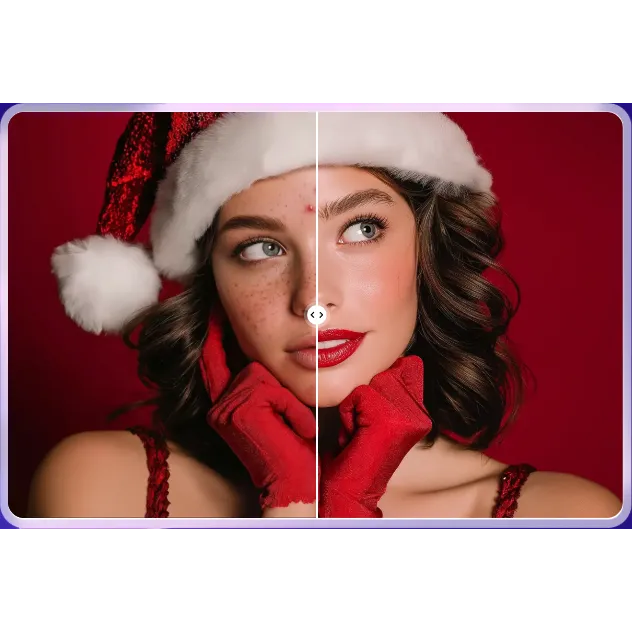
AI-based photo editing: Quickly and easily remove imperfections, reshape faces and bodies, adjust skin and hair color, completely solving post-production problems with portrait photos.
Color correction: Provides comprehensive intelligent color correction and an extensive set of filters.
Professional and efficient output: Supports batch processing and one-click presets to optimize workflow, significantly increasing speed and consistency in photo editing.
Imperfection Removal,
Achieving Flawless Skin
Automatically remove facial and body imperfections, including acne, blemishes, moles, and wrinkles, with a single click, making skin smooth and flawless while preserving natural texture.
Enhance skin radiance through skin tone adjustment and retouching, making it brighter, more transparent, and ensuring a more even color.
Efficient Face Reshaping,
Sculpting Exquisite Features
Through face reshaping settings, meticulously adjust features such as a narrower face, a higher nose, larger eyes, defined eyebrows, or fuller lips. Sculpt the perfect facial contours for natural, authentic results.
Professional AI Body Sculpting, Optimizing Proportions
With body adjustments, reshape bodies in photos! Easily achieve fuller breasts and hips or a narrower waist, legs, and arms, instantly creating golden proportions, showcasing the perfect figure at all times. Creative Hair Color Changer
Unlock endless styles
Hair color adjustment allows you to virtually try on trendy shades without dyeing, authentically simulating coloring effects to refresh your style. Retouch sparse areas separately to make your hair look thicker and fuller.
Download the program
https://www.pixpretty.ai/en/download.html
Program guide
https://www.pixpretty.ai/en/guide/how-to-use-pixpretty.html
Load more...
Questions are public and asked by users, not Gameflip. Stay safe by not sharing personal information like your name, payment information and game platform accounts.

Login to comment