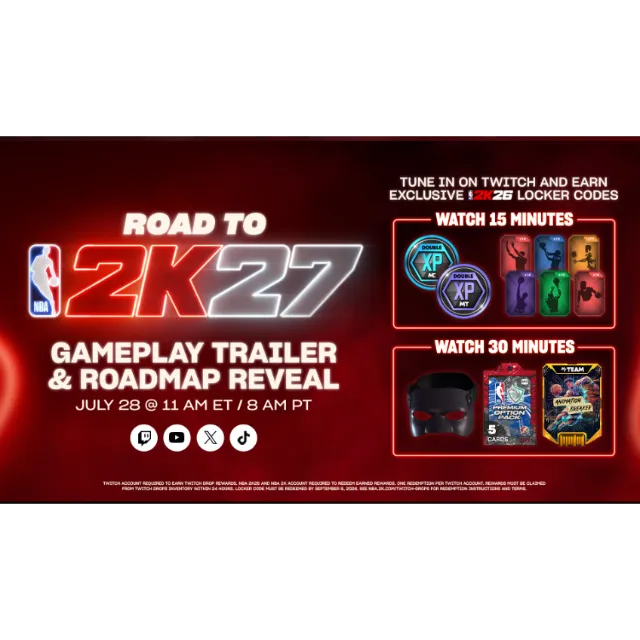
NBA 2K26 Locker Codes💎Invincible Premium Option Pack Face Mask Gold Animation Breaker



Get the item as described or your money back.
Receive immediately.
After payment, you will immediately receive 2 codes: one 15-minute code and one 30-minute code.
15 MIN CODE + 30MIN CODE
15 MINUTES
MyCAREER 1 Hour 2XP Coin
MyTEAM 1 Hour 2XP Coin
MyCAREER 60 Skill Boosts - 10x All Categories
30 MINUTES
MyPLAYER Face Mask
MyTEAM NBA Invincible Premium Option Pack (Unauctionable)
MyTEAM Gold Animation Breaker
Q: How do I redeem my NBA 2K26 Locker Code?
A: You can redeem your NBA 2K26 Locker Code in NBA 2K26, after you start the game for the first time and set up your NBA 2K Account. In NBA 2K26:
Go to MyCAREER or MyTEAM from the Main Menu.
In MyCAREER, select the “Options/Quit” menu while you are in The City / The Neighborhood. In MyTEAM, select the “MARKET” tab.
Select “Locker Codes”.
Enter the Locker Code you want to redeem. Locker Codes are not case-sensitive but be sure to include the hyphens.
In MyNBA2K for iOS & Android:
Login with the same PlayStation, Xbox, Nintendo, or Steam account you use in NBA 2K26.
Select “Locker Code”.
Enter the Locker Code you want to redeem. Locker Codes are not case-sensitive but be sure to include the hyphens.
Load more...
Questions are public and asked by users, not Gameflip. Stay safe by not sharing personal information like your name, payment information and game platform accounts.
Login to comment