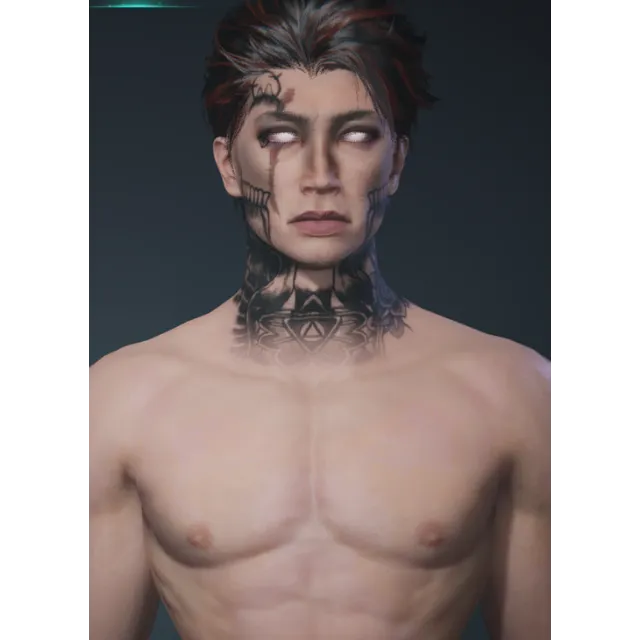
Once Human Male Character QR CODE



Obtenez l'article tel que décrit ou votre argent sera remboursé.
SEPARATE HAIRSTYLE
How to get:
step 1. I will send you an image containing a QR code
step 2. Open Once Human, and go to create a character
step 3. Press the file looking button below "look at"
step 4. Under Import Data, choose either "scan" or "select from album" (album does not always work, if it says invalid, use scan)
step 5. (to properly use scan, you must have the QR code displayed elsewhere, to use album, simply find the image and upload it.)
step 6. (if it saves as a anything other than a .png image) open the image in your files and press edit, then save as a duplicate and save it as a .png
step 7. Enjoy !
⚠ I WILL NOT CONFIRM DELIVERY UNTIL YOU SAY IT WORKED, OCCASIONALLY QR'S BREAK, SHOW ME A PROOF SCREENSHOT OF THE QR NOT WORKING AND I WILL PERSONALLY REDOWNLOAD THE CHARACTER FOR YOU ⚠
Charger plus...
Les questions sont publiques et posées par les utilisateurs, pas par Gameflip. Restez en sécurité en ne partageant pas d'informations personnelles telles que votre nom, vos informations de paiement et vos comptes de plateforme de jeu.
Connectez-vous pour commenter