

ACDSee Ultimate Pack 2026 | 6-Month Software Suite Subscription | Key

2 days ago

ACDSee Ultimate Pack 2026 | 6-Month Software Suite Subscription | Key
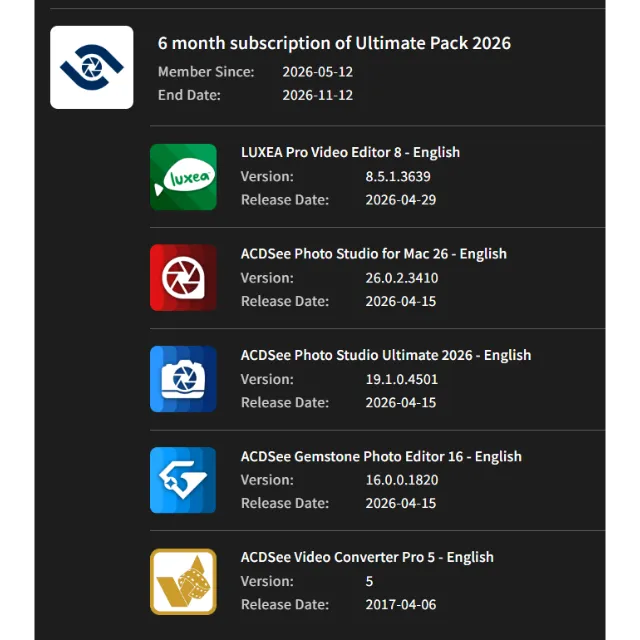
Upon activating the key, you gain access to full six-month versions of five software programs—completely free of functional limitations and including continuous updates—though technical support is not included:
1. LUXEA Pro Video Editor 8 — English
Version: 8.5.1.3639
Program Details:
https://www.acdsee.com/en/products/luxea-video-editor/
2. ACDSee Photo Studio Ultimate 2026 — English
Version: 19.1.0.4501
Program Details:
https://www.acdsee.com/en/products/photo-studio-ultimate/
3. ACDSee Video Converter Pro 5 — English
Version: 5
Program Details:
https://www.acdsee.com/en/products/acdsee-video-converter/pro/
4. ACDSee Photo Studio for Mac 26 — English Version
Version: 26.0.2.3410
Program Details:
https://www.acdsee.com/en/products/photo-studio-mac/
5. ACDSee Gemstone Photo Editor 16 — English
Version: 16.0.0.1820
Program Details:
https://www.acdsee.com/en/products/gemstone-photo-editor/
The ACDSee Ultimate Pack 2026 brings together five professional applications, enabling you to manage every stage of your photo and video production workflow within a single, comprehensive solution. Organize thousands of files using AI-powered digital asset management tools, batch-process photos (including RAW files), create complex multi-layered compositions, produce professional-grade videos, and much more. With the flexibility to install each product on up to three separate devices, this software suite empowers you to accomplish all of this from anywhere. Dream bigger, create faster, and stay productive with the ACDSee Ultimate Pack 2026 in your arsenal.
Learn more about the pack:
https://www.acdsee.com/en/products/packs/ultimate-pack/
Key Activation:
1. Log in to your account at:
https://acdid.acdsee.com/
2. Go to the Online Activation section and activate your key:
https://acdid.acdsee.com/online-activation
3. In the "My Plans & Products" section, select "Subscription" from the "Type" drop-down menu.
4. Scroll down the page, and your plan will be listed there. The "View More" section contains download links for current and future versions.
Charger plus...
Les questions sont publiques et posées par les utilisateurs, pas par Gameflip. Restez en sécurité en ne partageant pas d'informations personnelles telles que votre nom, vos informations de paiement et vos comptes de plateforme de jeu.