LifeTime Updates EaseUS Partition Master Professional Version 19.0 License Key Download



Nhận sản phẩm đúng như mô tả, nếu không bạn sẽ được hoàn lại tiền.
==> How To Create Partition With easeUS Partition master?
Right-click unallocated space, select "Create...". Set Partition Size, Drive Letter, Partition Label, and File System for the new partition and click "OK". Click "Execute Operation" and "Finish".
==> How To Extend Partition With easeUS Partition master?
To extend a partition, right-click the target partition, select "Resize/move". Drag the end of the partition into the unallocated space, click "OK". Click "Execute Operation", "Apply" and "Finish".
==> How To Format Partition With easeUS Partition master?
Right-click on the target partition that you tend to format, select "Format...". Set the File System as NTFS, FAT32, exFAT, EXT2/3/4, and click "OK". Click " Execute Operation", "Apply" and "Finish".
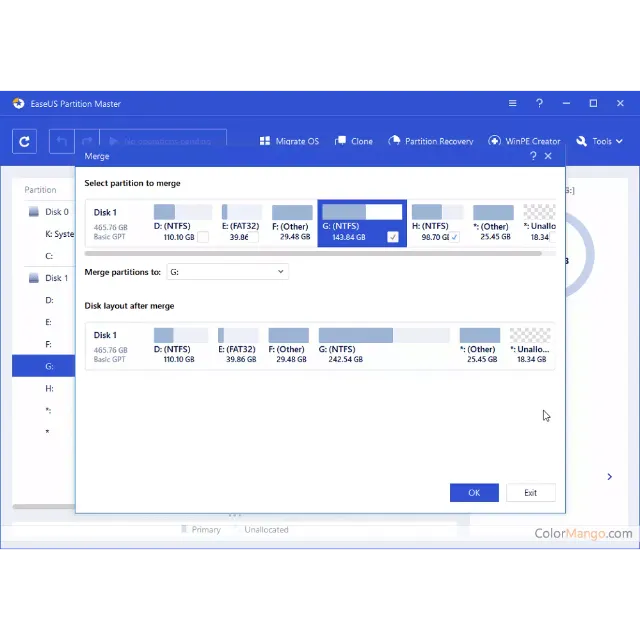
==> How To Merge Two Partitions With easeUS Partition master?
Right-click a partition with enough free space and select "Merge". Then select a target partition that you want to keep and click "OK". Click "Execute Operation", "Apply" and "Finish".
==> How to Find Hidden Partition or Hide Partition in Windows 10/8/7 ?
Option 1 - Hide Partition
Right-click the partition, and choose "Advanced". Select "Hide" from the drop-down menu.
Then you will see a window showing the notification. Read the instructions and click "Yes" to continue.
Click the "Execute 1 Task(s)" button in the top-left corner. Then, click "Apply" to hide your partition.
Option 2 - Unhide Partition
Right-click the partition you want to view and access. choose "Advanced" and select "Unhide" from the drop-down menu.
Read the instructions and click "Yes" to continue.
Click the "Execute 1 Task(s)" button in the top-left corner. Check the pending operations, then click "Apply" to unhide the partition on Windows 11/10/8/7.
==> How to Convert Primary Partition to Logical Partition ?
Right-click the partition you want to convert and choose the convert option:
1. Primary to Logical
2. Logical to Primary
Click the "Execute 1 Task" button and then choose "Apply" to begin the conversion.
==> How to Initialize SSD/HDD in Windows 10/8/7 ?
Step 1. Open EaseUS Partition Master and got to Partition Manager.
Step 2. Right-click the target disk - HDD or SSD and select "Initialize to MBR" or "Initialize to GPT". Click "Execute Task" and "Apply" to save the changes.
Xem thêm...
Các câu hỏi được công khai và do người dùng đặt ra chứ không phải Gameflip. Giữ an toàn bằng cách không chia sẻ thông tin cá nhân như tên, thông tin thanh toán và tài khoản nền tảng trò chơi của bạn.

Đăng nhập để bình luận