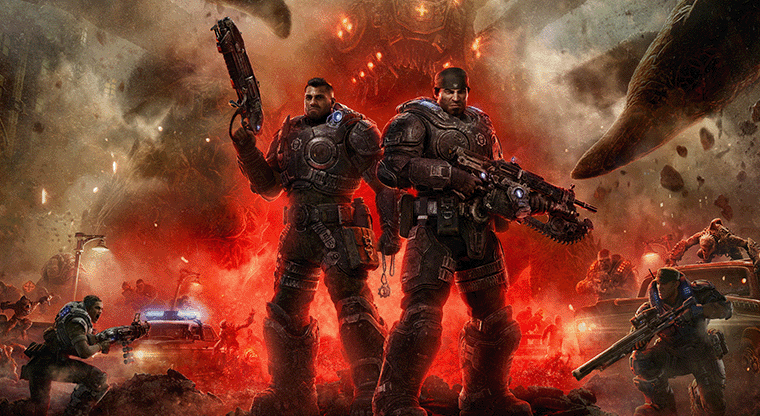

When the ground opens up in Kalona and the Locust Horde climbs out of the dark depths of Sera, chaos reigns. Gears of War: E-Day takes the iconic franchise back to where the nightmare began, dropping players directly into the raw horror of Emergence Day alongside a younger Marcus Fenix and Dominic Santiago.
Whether you are a veteran Gears player dusting off your Lancer or a newcomer stepping into Sera's brutal fight for survival for the very first time, E-Day resets the playing field. The combat is claustrophobic, heavy, and unforgiving. Standing out in the open for even two seconds will get you turned into paste by a Locust Drone wielding a Hammerburst.
To help you survive your first night in Kalona without seeing the game over screen every two minutes, we’ve put together the ultimate Gears E-Day beginner guide. Here is everything you need to know about combat discipline, resource management, co-op survival, platform availability, and getting your squad battle-ready.
🎮 Platforms, Game Pass & Co-Op Availability
Before diving into combat mechanics, it is essential to know where you can play and how multiplayer operates across platforms.
Where to Play
- Platforms: Gears of War: E-Day is available on Xbox Series X|S, Windows PC (via Steam and the Xbox App), and Xbox Cloud Gaming. Older-generation Xbox One consoles and PlayStation 5 are not supported.
- Gears E-Day Game Pass Access: The game is a Day One launch title on Xbox Game Pass Ultimate and PC Game Pass. If you are playing on Xbox Series X|S, remember that online co-op and multiplayer modes require an active Xbox Game Pass subscription. Steam players do not require a console subscription to play online.
- Xbox Play Anywhere: If you purchase the digital version through the Xbox Store or play via Game Pass, your progress, achievements, and purchases sync seamlessly between your Xbox Series X|S console and PC.
Gears E-Day Co-Op Rules You Must Know
Gears of War was built around the principle of never fighting alone. The entire campaign supports up to 4 players in online co-op. Here are the key co-op quirks to keep in mind before forming your squad:
- Split-Screen Limitations: Local 2-player split-screen co-op is available exclusively on Xbox Series X|S consoles. The PC version (Steam and Xbox app) does not support local split-screen.
- Independent Difficulty Selection: You don't need to fight over difficulty settings! In co-op, every player selects their own individual difficulty tier. A veteran player can run on Insane while a newcomer plays on Casual in the exact same campaign lobby.
- Host-Only Pausing: Opening your menu during an online co-op session does not pause the game for everyone. Only the campaign host has the authority to pause the shared game.
⚙️ Combat Fundamentals: Mastering the Cover Shooter
The fundamental rule of Gears of War: E-Day is simple: Cover is life. Trying to play E-Day like a run-and-gun arena shooter will get you sent to an early grave.
1. Cover Discipline Over Speed
Every gunfight in E-Day revolves around positioning. Always slide into cover behind solid structures—concrete barriers, steel beams, or heavy brick walls—before firing a single shot.
- Avoid relying on soft cover like wooden crates or flimsy furniture when heavy weapons come out, as enemy fire will splinter weak barriers.
- Use cover-swapping (sliding smoothly between adjacent cover points) to change angles on enemy squads without exposing your hitboxes to direct line-of-sight.
2. Perfect the Active Reload
When your magazine runs low, hitting the reload button triggers a timing bar near your ammo icon.
- Normal Reload: Pressing reload and letting the bar fill naturally.
- Failed Reload: Pressing too early or too late jams your weapon, leaving you completely vulnerable while your character clears the breach.
- Active Reload: Hitting the button right inside the gray zone reloads your weapon much faster.
- Perfect Active Reload: Hitting the tiny white sweet spot reloads your weapon instantly and temporarily grants a damage boost to your fresh magazine. Mastering this rhythm in your first hour is vital for high damage output.
3. Master Target Priority
When Emergence Holes open up, Locust forces flood the arena. Panicking and shooting the nearest target isn't always the smartest play. Establish clear target priority:
- Tickers & Wretches: Fast-moving, close-quarters enemies that rush your cover. Flush them out before they force you out of position.
- Grenadiers & Flankers: Shotgun-wielding Locust that aggressively push your flanks.
- Drones & Snipers: Ranged threats holding static cover in the backline.
🪓 Co-Op Strategy & Squad Coordination
Whether you are playing with AI squadmates or jumping into Gears E-Day co-op with three friends, working as a cohesive unit makes brutal firefights far more manageable.
Utilize the Tactical Ping System
Gears of War: E-Day features an intuitive pinging mechanic. While aiming down sights, hit the ping button to highlight enemies, ammo crates, or flank paths. Pings show up clearly on your squadmates' screens—even through solid walls—making headset-free communication quick and reliable.
Saving Pinned and Downed Teammates
When a squadmate loses all their health, they drop into a "DBNO" (Down But Not Out) state. You can rush over to revive them before they bleed out. However, aggressive Locust enemies—like Drones—will physically pounce on downed players to execute them.
- If a Drone pins your teammate, you don't necessarily have to run up to melee them. You can shoot the attacking Drone off your partner from a distance or pull them off to save your teammate's life.
Cross-Play Setup
Steam and Xbox players share the same matchmaking pool. While Steam players don't need a Microsoft account to play online co-op with other Steam users, you must link a free Microsoft Account if you want to send or receive cross-platform invites between Xbox consoles and PC.
🎒 Resource Conservation & Scavenging Tips
Ammo and grenades are scarce during the opening hours of Emergence Day. Wasting whole magazines on blind fire will leave you empty-handed when a heavy boss encounter begins.
- Don't Sleep on Secondary Weapons: The classic Lancer and Gnasher Shotgun combination is iconic, but carrying a Snub Pistol or Boltok for long-range precision shots conserves your primary rifle ammunition.
- Execution for Drops: Executing downed enemies with melee attacks or the Lancer's chainsaw bayonet guarantees you clear the field quickly without spending extra bullets.
- Scavenge After Encounters: Before pressing forward to trigger the next story checkpoint, thoroughly search defeated enemy positions for dropped Hammerbursts, Snub rounds, and Frag Grenades.
📋 The First Night Survival Checklist
To ensure your journey through the five Acts of Kalona gets off to a smooth start, use this spoiler-light checklist for your first session:
- [ ] Verify Platform Subscriptions: Ensure Xbox Series X|S console players have an active Xbox Game Pass tier for online co-op.
- [ ] Configure Independent Difficulties: Let every squad member pick the difficulty setting that matches their skill level.
- [ ] Agreed Host Setup: Confirm who is hosting the co-op session, keeping in mind that only the host can pause.
- [ ] Link Microsoft Accounts for Cross-Play: Link your Steam and Microsoft accounts if playing across different platforms.
- [ ] Practice Active Reloads: Spend your first few skirmishes dialing in the perfect active reload timing bar.
- [ ] Map the Ping Button: Make sure your ping command is bound to an easily accessible button on your controller or keyboard.
💳 Gear Up for Emergence Day on Gameflip
Whether you are topping up your account balance for an Xbox Game Pass Ultimate membership, grabbing digital games on Steam, or gifting digital console credit to your co-op squadmates, smart preparation keeps your gaming budget under control.
On Gameflip, you can compare live marketplace offers on supported digital gaming products:
- Xbox Gift Cards & Game Pass Subscriptions: Fund your console wallet or lock in Xbox Game Pass Ultimate access before stepping onto the battlefield.
- Steam Wallet Cards: Top up your Steam account balance to grab digital copies or DLC upgrades.
⚠️ Quick Compatibility Check: Digital gift cards and game keys are frequently region-locked or currency-bound. Always double-check that the listing's region and currency match your account's home region before completing your checkout!
Final Thoughts
Gears of War: E-Day captures the horror, grit, and desperate fight for survival that made the franchise a global powerhouse. By respecting cover discipline, mastering active reloads, communicating cleanly in co-op, and managing your resources wisely, you and your squad will be well-equipped to survive the horrors of Emergence Day. Gear up, stick together, and welcome back to Sera!